
Delta Executor Key
Delta Executor may require an activation key before users can access its advertised mobile scripting features. The key system is intended to verify access to the application, and the process may differ between Android and iOS.
If the app displays a key prompt, this guide explains the general steps for understanding the activation process, locating the key request option, and entering a key when available.
Delta Mobile requires an activation key before it will run roblox scripts – similar to other mobile executors like Hydrogen. If you don’t already have a key, follow the steps below to generate one and activate the app.
Important: Key-system pages can change, and the steps below are based on the supplied instructions rather than an independently verified current workflow. Avoid suspicious redirects, unexpected downloads, and requests for sensitive account information.
How to Get a Delta Executor Key on Android
If Delta Mobile displays a key prompt on your Android device, follow the app’s documented activation instructions.
Step 1: Open Delta Mobile
Install the application only after checking the source and verifying that the file is trustworthy. Open Delta and look for the activation screen.
Step 2: Select Receive Key
If you do not already have an activation key, look for the Receive Key option. If available, this may open or copy a link associated with the key-generation process.
Step 3: Open the Key-System Link
If the app provides a link, inspect its destination before opening it. Use a browser to access the page only if you trust the source.
Be cautious if the page redirects repeatedly, requests account credentials, or asks you to install unfamiliar applications.
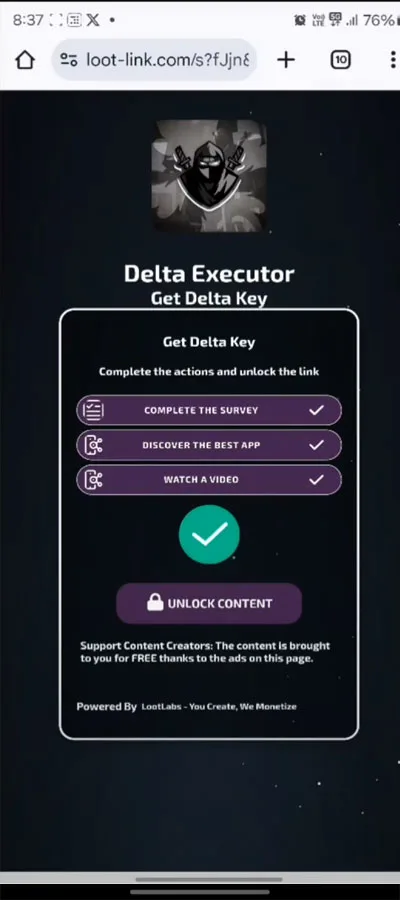
Step 4: Review the Required Tasks
Some third-party key systems use advertising or verification tasks before displaying a key. The number and type of tasks may change.
Do not install unknown APK files, grant unnecessary permissions, subscribe to unwanted services, or provide personal information simply to obtain a key. You can stop if the requirements appear suspicious.
Step 5: Copy the Generated Key
If the process successfully provides a key, use the page’s copy option or copy the displayed value manually.
Do not share your key publicly if it is associated with your individual access session.
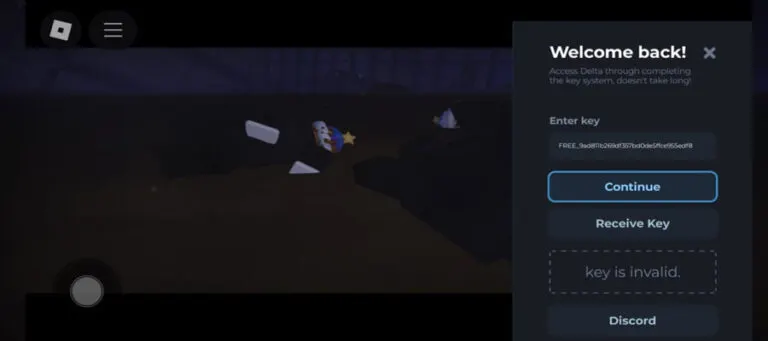
Step 6: Enter the Key in Delta
Return to the application and locate the activation field. Paste the key and select Continue if the app provides that option.
If activation fails, verify that the key has not expired and that it belongs to the correct app version. Do not assume that every key-system page is genuine.
How to Get a Delta Executor Key on iPhone and iPad
The iOS activation process may resemble the Android workflow, but the app version and installation method can affect the available options.
- Open the installed Delta ios application and check whether a key prompt appears.
- If you do not have a key, look for the Receive Key option.
- If the application provides a link, inspect its destination before opening it in Safari.
- Review any verification requirements displayed on the page.
- Avoid installing unknown configuration profiles, accepting unexpected subscriptions, or downloading untrusted files.
- If a key is generated successfully, copy it.
- Return to Delta, paste the key into the activation field, and select Continue if prompted.
These steps describe the general process and do not guarantee that a current iOS key system will use the same screens or requirements.
Why Is the Delta Key Not Working?
Several issues may prevent a key from activating the application.
Expired Key
Some activation systems issue temporary keys. If yours has expired, consult the application’s verified instructions for obtaining a valid replacement.
Incorrect Key
Check that you copied the complete key without extra spaces or missing characters.
Wrong App Version
A key generated for one version or platform may not work with another. Confirm that the key and application are compatible.
Key-System Page Not Loading
Browser problems, blocked redirects, or changes to the key provider may interrupt the process. Avoid installing unknown software or disabling security protections to force the page to load.
Activation Server Error
The key provider or application may be experiencing a temporary problem. Check trustworthy release information before trying again.
Is the Delta Executor Key System Safe?
Not every third-party key system is trustworthy. Some pages may use advertising redirects, while others may request unnecessary permissions or direct users to potentially harmful downloads.
For your safety:
- Never provide your Roblox password or session cookies to a key-generation page.
- Do not install unknown applications just to complete verification tasks.
- Avoid configuration profiles from untrusted sources.
- Do not disable your device’s security protections to obtain a key.
- Review any subscription, payment, or personal-information request carefully.
Also remember that third-party Roblox executors may violate Roblox’s rules and could lead to account restrictions.
Frequently Asked Questions
Is a Delta Executor key required?
The supplied instructions describe a key-based activation process for Delta Mobile. Whether a key is required depends on the current app version and its activation system.
Can I use an Android key on iOS?
Cross-platform compatibility should not be assumed. Check the application’s current documentation to determine whether keys are specific to a device or version.
How long does a Delta key last?
The expiration period may depend on the current key system. Verify the terms displayed by a trustworthy source rather than relying on an outdated duration.
What should I do if Receive Key does not work?
Check whether the app is compatible with your device and whether its activation service is available. Avoid unofficial replacement apps and suspicious key-generation websites.
Final Thoughts
The Delta Executor key process generally involves opening the app, requesting a key if required, completing any legitimate verification steps, and entering the generated value in the activation field.
However, the exact workflow can change between Android and iOS versions. Verify the source of any key-system link, avoid suspicious downloads, and never compromise your Roblox account security to activate a third-party application.