100 Days At Sea Script Elvis Fofo Hub [No Key] – Bring Items
The 100 Days At Sea Script Elvis Fofo Hub is a Roblox script advertised with several gameplay features for the 100 Days At Sea experience. It includes options such as Bring Items, Teleport, ESP, Fly, WalkSpeed, and Instant Interact, offering different ways to modify or automate certain in-game activities.
Elvis Fofo Hub is listed as a keyless script, meaning it is advertised as not requiring a separate key verification process. However, its availability, safety, and compatibility may vary depending on the script version and Roblox updates.
Copy 100 Days At Sea Script Elvis Fofo Hub
loadstring(game:HttpGet("https://raw.githubusercontent.com/SuperHackerYT/Main/refs/heads/main/100DaysatSeaOBF.lua"))()100 Days At Sea Script Features
Elvis Fofo Hub offers a range of advertised features for navigation, item selection, movement, and interacting with in-game objects. Here’s an overview of the listed functions.
1. Teleport Features
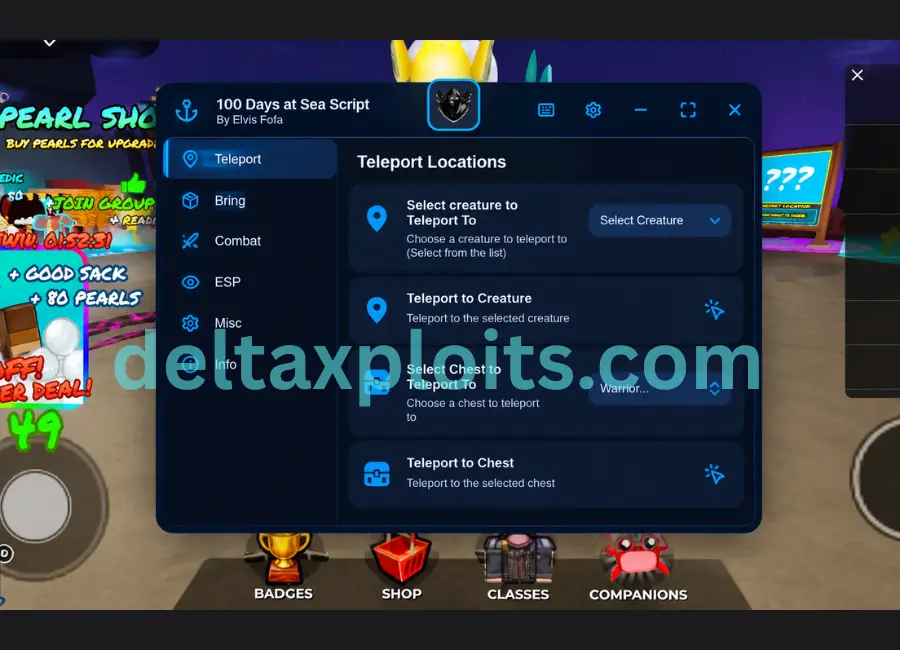
The script includes several teleport options intended to help players move to specific locations or nearby targets without traveling there manually.
- Teleport to Creature: Teleport toward a creature in the game.
- Teleport to Chest: Move directly to a chest location.
- Teleport to Bonfire: Travel to the bonfire.
- Teleport to Merchant: Move to the merchant’s location.
- Teleport to Fisherman: Teleport toward the fisherman.
The effectiveness of these options may depend on the game’s current mechanics and script compatibility.
2. Bring Items
The Bring Items feature is designed to move selected in-game items toward the player or a chosen location, depending on how the script implements the function.
- Select Item to Bring: Choose the item you want to target.
- Bring Items: Activate the advertised item-moving function.
The actual behavior may vary, and the feature should not be assumed to work with every item.
3. ESP Features
ESP refers to an extra visual overlay that can help identify selected objects or entities in a game.
Elvis Fofo Hub lists the following ESP options:
- Select Item to ESP: Choose which item to highlight.
- Enable ESP: Turn the visual feature on.
- Update ESP: Refresh the displayed information.
These functions are advertised as ways to make selected items easier to identify.
4. Movement Controls
The script also lists movement-related options that may change how the character moves around the game.
- WalkSpeed: Adjust the character’s walking speed.
- Lock WalkSpeed: Attempt to maintain the selected walking speed.
- Fly: Enable the advertised flying function.
- Fly Speed: Adjust the flying speed.
These features may behave differently across game versions and could trigger anti-cheat systems.
5. Instant Interact
Instant Interact is intended to reduce the time needed to interact with supported objects or activities. Its availability may depend on the game’s interaction system and the current script version.
6. Click Instant Kill NPCs
This feature is advertised as an option to instantly eliminate supported NPCs through a click-based action. Its actual behavior and compatibility have not been independently verified.
100 Days At Sea Script Details
Here is a quick summary of the information provided in the script listing.
| Detail | Information |
|---|---|
| Script Name | Elvis Fofo Hub |
| Roblox Game | 100 Days At Sea |
| Key System | Advertised as No Key |
| Main Feature | Bring Items |
| Teleport Options | Creature, Chest, Bonfire, Merchant, Fisherman |
| Visual Features | ESP, Update ESP |
| Movement Features | WalkSpeed, Lock WalkSpeed, Fly, Fly Speed |
| Other Features | Instant Interact, Click Instant Kill NPCs |
| Publisher Listing | Team DarkSpawner |
| Reported Status | Listed as verified and working |
Important: The working status is based on the supplied listing. It does not independently confirm that the script currently works or that every advertised feature is available.
How to Check the 100 Days At Sea Script
Before trying a third-party Roblox script, review its source and compatibility information carefully.
- Open the official 100 Days At Sea Roblox experience.
- Check the latest available information for Elvis Fofo Hub.
- Confirm that the listed version is intended for the correct game.
- Avoid unknown downloads and websites requesting Roblox passwords, session cookies, or other sensitive information.
- Stop if the script causes errors, unexpected behavior, or account security concerns.
Third-party scripts can violate Roblox’s terms or the game’s rules and may lead to account restrictions. Consider these risks before using them.
Also Check: Phonk Clicker Script Nexus Hub
Is 100 Days At Sea Script Elvis Fofo Hub Keyless?
Yes, the supplied listing advertises Elvis Fofo Hub as a No Key script. This means it is presented as not requiring a separate key verification step.
However, keyless access does not guarantee that the script is safe, updated, or compatible with your device. Always verify the source before interacting with third-party script files.
Is Elvis Fofo Hub Working in 100 Days At Sea?
The provided listing marks the script as verified and working. However, this status may refer to an earlier test and should not be treated as proof of current functionality.
Game updates, Roblox client changes, and script revisions can affect features such as Bring Items, ESP, Teleport, and Fly. Check recent reports from a trustworthy source before relying on these functions.
Final Words
The 100 Days At Sea Script Elvis Fofo Hub [No Key] is advertised as a feature-rich Roblox script with Bring Items, multiple teleport options, ESP, movement controls, and interaction-related functions.
Its main attraction is the variety of listed tools for navigating the game and targeting selected items or entities. Nevertheless, feature availability and compatibility are not guaranteed. Review the source carefully, protect your Roblox account, and consider the risks associated with unauthorized scripts before proceeding.